

Summary
This guide explained the steps for withdrawing funds from your wallet using TopChange, including selecting the wallet, choosing the payment method, entering the amount, and confirming the whitelist. Once submitted, your withdrawal request will be processed as quickly as possible.
Withdraw from DeltaFX Wallet Using TopChange
One of the available withdrawal methods in DeltaFX is TopChange. Follow the steps below to withdraw funds from your wallet using this method:
Go to Wallet Section
From your dashboard menu, select Wallet.Choose “Withdraw from Wallet”
On the wallet page, click Withdraw from Wallet.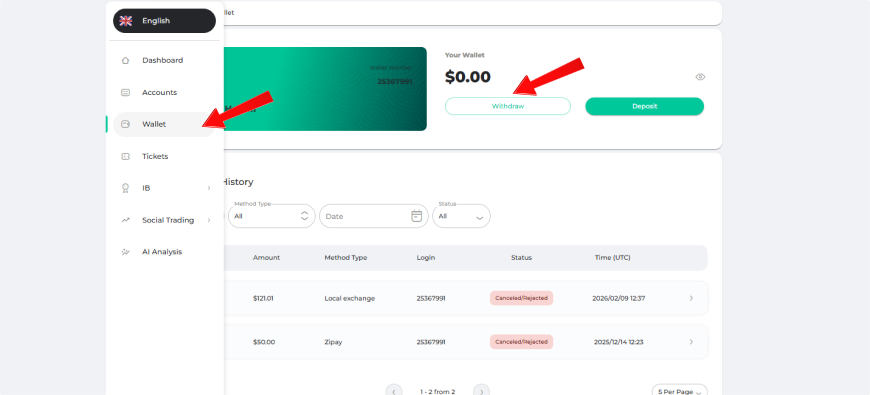
Select Payment Method
Set the payment method to TopChange.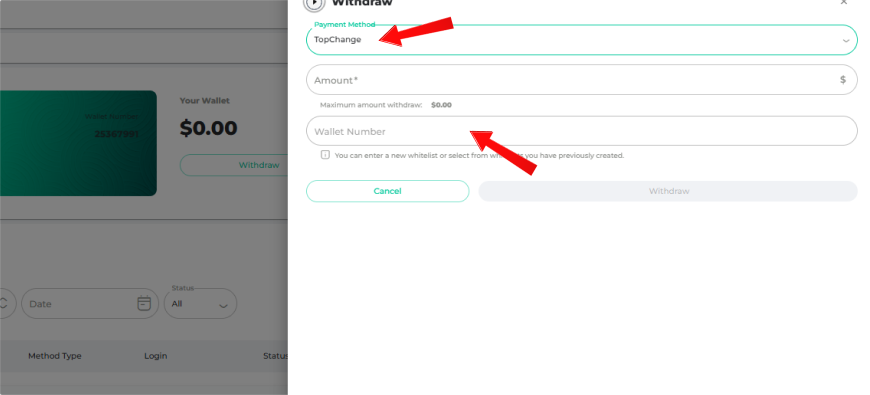
Enter Withdrawal Amount
Enter the desired withdrawal amount.
You will see:
The commission fee
The final payable amount after commission deduction
Click Withdraw to proceed.
Enter Your TopChange Whitelist
In the next step, enter your TopChange whitelist details and click Confirm.
Your withdrawal request will be reviewed and processed as quickly as possible.
Other tutorials related to the DeltaFX user panel
Broker registration tutorial -> Broker authentication tutorial -> Activating two-step authentication -> Comprehensive tutorial on depositing to the broker -> Broker account opening tutorial -> Broker withdrawal tutorial -> Broker support tutorial
Video of withdrawing money from a wallet using the Top Change method
Support: If you encounter any issues, contact DeltaFX via online chat, email, or phone.